


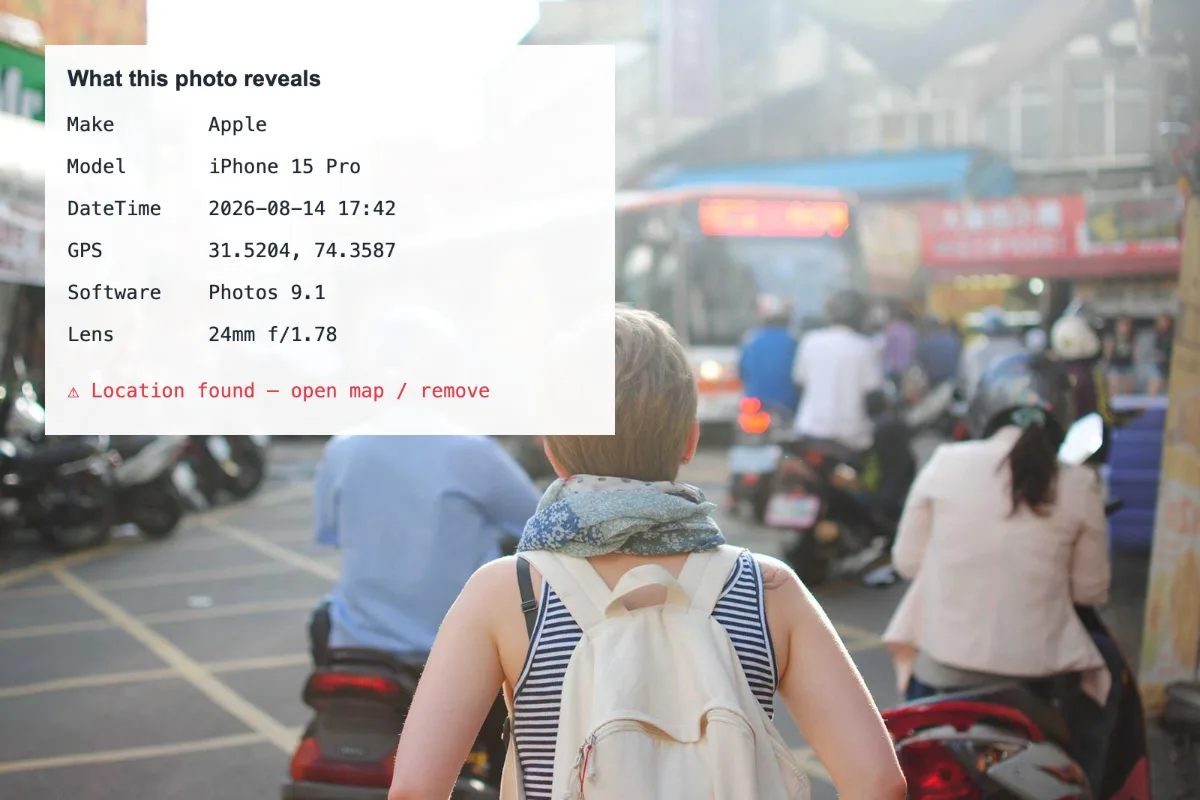
Open a photo and see every tag it carries: make and model, lens, exposure, software, dates and GPS coordinates with a map link. Nothing is sent to a server; the file is parsed in your browser.
What is Image Metadata Viewer?
Our image metadata viewer shows everything stored inside a photo file: the camera make and model, lens, exposure settings, the software used, date and time stamps, and GPS coordinates when they exist. If a location is found, you get a clear warning with a link to see it on a map.
It is the quickest way to check what a photo would reveal about you before you share it, or to learn how someone else's picture was taken. The file is read and parsed in your browser, so even photos with sensitive location data stay on your device while you inspect them.
How to use the Image Metadata Viewer
- Drop a photo.
- Read the tags; click the map link if GPS is present.
- Use Remove EXIF to strip them.
How Image Metadata Viewer works
Digital photos carry several kinds of hidden information. EXIF is written by the camera or phone and records settings such as shutter speed, aperture and ISO, along with the date and, often, GPS position. TIFF tags describe the image itself, IPTC carries captions and copyright notes added by photographers and agencies, and XMP stores information added by editing software.
The viewer reads these blocks directly from the file's bytes and lists every tag it finds in a simple table. GPS values are converted from the degrees, minutes and seconds format used inside the file into decimal coordinates you can paste into any map.
If nothing shows up, the photo has usually been stripped already. Screenshots never had camera data, and most messaging apps and social networks remove metadata from the copies they send or display.
Key features of Image Metadata Viewer
Free EXIF inspection
View the metadata of your photos at no cost. There is no limit on file count per batch, and a whole batch counts as one run.
Every tag, read directly
The viewer parses EXIF, TIFF, GPS, IPTC and XMP blocks straight from the file, showing the raw tag names and values. GPS coordinates are given to six decimal places, which is accurate to roughly 10 cm.
Results the moment you drop
Metadata is read as soon as the file is opened, with nothing sent anywhere and no button to press. Even large camera files show their full list of tags in about a second.
Check photos on your phone
Inspect pictures straight from your camera roll in Safari on iPhone or Chrome on Android, or on Windows, macOS and Linux in Chrome, Edge, Safari or Firefox. JPG, PNG, WEBP, HEIC and TIFF are supported.
Readable tag table
Results appear in a plain two-column table that screen readers handle well, with GPS warnings shown as clear text alerts. The page supports keyboard navigation, dark mode and browser zoom.
Parsed on your device
The photo is read in your browser and never stored on a server. Only if you click the map link are the coordinates opened on OpenStreetMap, and the image itself is never sent.
What makes EZ Compress's Image Metadata Viewer different
Location warning up front
Rather than burying GPS among dozens of tags, the viewer highlights it at the top with the decimal coordinates, a map link and a direct link to remove the location.
Inspect without sending it anywhere
Many EXIF viewers send the photo to their servers, which hands its location over. Here the file is parsed locally, so checking a photo never exposes it to anyone.
One click to clean it
Found something you do not want to share? The Remove it link opens our Remove EXIF tool, which strips every tag and gives you a clean copy in a few seconds.
Why use Image Metadata Viewer?
Before posting a photo publicly or sending it to someone you do not know, it is worth checking what it carries. An EXIF viewer shows instantly whether a picture contains GPS coordinates, the exact time it was taken or the device that took it.
Photographers use an image metadata viewer for the opposite reason: to learn. Seeing the shutter speed, aperture, ISO and lens behind a shot you like is one of the fastest ways to understand how it was made. It is also useful for checking when a picture was really taken.
Who can use Image Metadata Viewer?
Privacy-conscious sharers
Check holiday and home photos for GPS coordinates before posting them online or sending them to people outside your circle.
Photography learners
See the shutter speed, aperture, ISO and focal length behind your best shots, and compare them with the ones that did not work.
Journalists and researchers
Check the date, device and editing software recorded in a photo as one part of verifying where and when it was taken.
IT and security staff
Show colleagues during security training how much an ordinary phone photo reveals, using their own pictures, which never leave their devices.